Options
Last updated 2026-04-02
Options are where one goes to configure various games options, and is accessible from the Main Menu.
Graphics
| Setting | Options |
|---|---|
| Image | |
| Display Mode (Resolution) | 1280x720, 1600x900, 1920x1080, 2276x1280, 2560x1440, 3840x2160 Windowed/Full-Screen |
| Image Quality | High, Medium, Low, Custom |
| Custom | |
| FPS | 30, 60, Unlimited |
| Vertical Sync | Disable, Enable |
| Rendering | 0.8, 1.0, 1.2 |
| Anti-Aliasing | Disable, TAA, SMAA |
| Global Illumination | Low, Medium, High |
| Shadows | Low, Medium, High |
| FX Quality | Very Low, Low, Medium, High |
| Shading Quality | Low, Medium, High |
| Character Quality | Low, High |
| High-Precision Character Resolution | Disable, Dynamic, Global |
| Environment Quality | Low, High |
| Anisotropic Filtering | 1x, 2x, 4x, 8x, 16x |
| Mirror Reflections | Disable, Low, Medium, High |
| Volumetric Fog | Disable, Low, Medium, High |
| Bloom | Disable, Enable |
| Motion Blur | Disable, Enable |
| Distortion | Disable, Enable |
| Color Filter Strength | 0-10 |
Input
| Setting | Options |
|---|---|
| UI Layout Quick Switch Mode | Seamless Recognition, Button Switch |
| Camera Sens (X-axis) | 1-5 |
| Camera Sens (Y-axis) | 1-5 |
| Inverted Camera (X-axis) | Default, Invert |
| Inverted Camera (Y-axis) | Default, Invert |
| Manual Lock-On Switching Sensitivity | 1-10 |
| Automatic Camera Rotation | Off, On |
| Shortcut Wheel Settings | [Click to Select] |
| Board Camera Sensitivity | 1-5 |
Mouse & Keyboard
Main article: Controls § Mouse & Keyboard, Controllers
Allows the player to change the various keybinds, or change controller layout. See the Controls page for more details.
Sound
| Setting | Options |
|---|---|
| Main Volume | 0-10 |
| Music Volume | 0-10 |
| Dialog Volume | 0-10 |
| SFX Volume | 0-10 |
| Ambience Noise Volume | 0-10 |
| Playback Device | Headphones, Speaker, TV |
| Mute While in Background | Disable, Enable |
Language
| Setting | Options |
|---|---|
| Game Language | 简体中文 (Chinese Simplified), 繁體中文 (Chinese Traditional), English, 한국어 (Korean), 日本語 (Japanese), Español (Spanish), Русский (Russian), ภาษาไทย (Thai), Tiếng Việt (Vietnamese), Bahasa Indonesia (Indonesian), Français (French), Deutsch (German), Português (Portuguese [Brazil]) |
| Voice Language | Chinese, English, Japanese, Korean |
| Keyboard Layout | General Keyboard, French Keyboard, German Keyboard |
Account
| Setting | Options |
|---|---|
| USER CENTER | View Here (opens https://account.hoyoverse.com/) |
| Privacy Policy | View Here (opens https://zenless.hoyoverse.com/en-us/company/privacy) |
Other
| Setting | Options |
|---|---|
| Show Combat DMG | Disable, Default Effect, Damage Compilation |
| Chain Attack Mode | Auto Mode, Manual Mode |
| Run in City | Hold, Press |
| Normal Dialogue [Text Appears Gradually] | Disable, Enable |
| Speed Up Daily Combat End Animation | Disable, Enable |
| Main Story Difficulty | Casual Mode, Challenge Mode |
| Quick Use of Bangboo Plug-Ins on the Board | Hold, Press |
| Remember Board Acceleration Status | Disable, Enable |
| Chessboard Camera Distortion Influence | 0-100 |
Change History
Released in Version 0.13 - Tuning Test
- Added a combat Damage Compilation function under Show Combat Damage. During combat, damage numbers will be consolidated based on skill type and attribute.
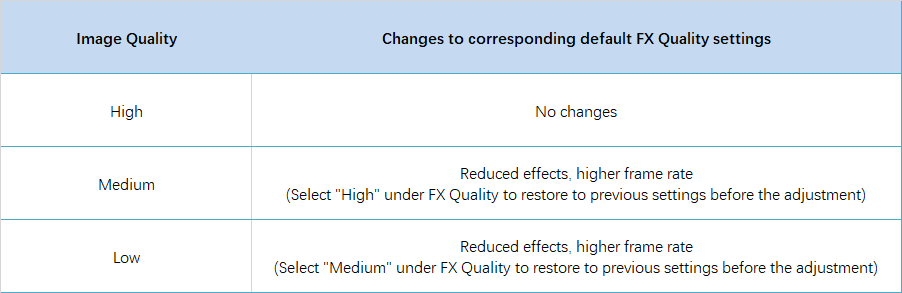
- Adjusts the default corresponding FX Quality settings for Image Quality levels under Options - Graphics in the PC client. For medium and low Image Quality presets, it reduces the corresponding special effects performance to improve frame rates. The specific changes are as follows:
- Options was released.
| ||||||||||||||||||||||||||||||||